How to get a free PAN card online (Instant e-PAN)
Get a new PAN almost instantly and free of cost, with your Aadhaar and DigiLocker on the Income Tax e-Filing portal.
સત્તાવાર સ્ત્રોત: Income Tax e-Filing portal (Income Tax Department)
Instant e-PAN is the Income Tax Department's free way to get a new PAN. You get your PAN as a PDF file (an e-PAN). The portal says it holds the same value as a physical PAN card.
Can I use this?
You can, if all of these are true:
- You are an individual (a person, not a company or firm).
- You do not already have a PAN. Having two PANs is against the law, and the portal warns that it can attract a penalty of ₹10,000.
- You are not a minor (under 18) on the day you apply.
- You have an Aadhaar number, and a mobile number linked to that Aadhaar.
- You have a DigiLocker account, and it holds one of the documents in the next section as proof of your date of birth.
- You are not applying as a representative of someone else (a "representative assessee").
If you cannot use Instant e-PAN, you can still apply for a PAN through the other official channels, Protean (formerly NSDL) or UTIITSL. The portal also sends you there if your e-PAN request is rejected or not handled within 24 hours.
Documents you will need
No papers to upload. You need:
- Aadhaar number, with the mobile number linked to it nearby (you will get two OTPs).
- DigiLocker security PIN (the 6-digit PIN you set in DigiLocker).
- In your DigiLocker, one of these as proof of date of birth:
- Birth certificate
- Matriculation (Class 10) certificate
- Matriculation marksheet from a recognised board
- Driving licence
- CGHS card
- Your father's name, which you type in.
Cost
Free. The portal says the PAN "is issued in PDF format to applicants, which is free of cost".
Steps
-
Open the Income Tax e-Filing portal. Under Quick Links, click Instant E-PAN.
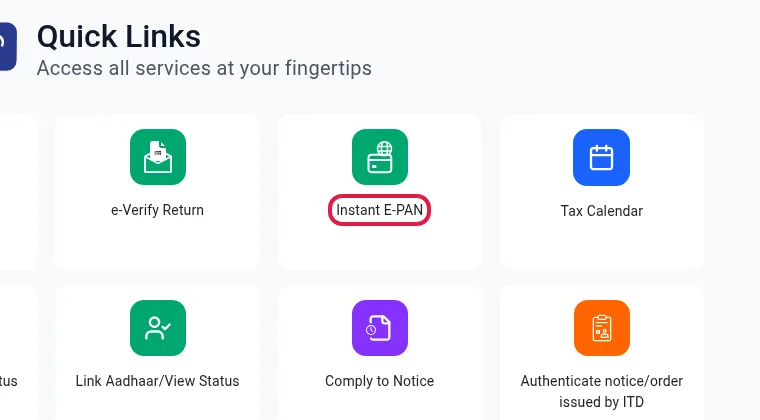
Screenshot of incometax.gov.in, 14 Oct 2026. The red outline is ours. -
On the e-PAN page, click Get New e-PAN.
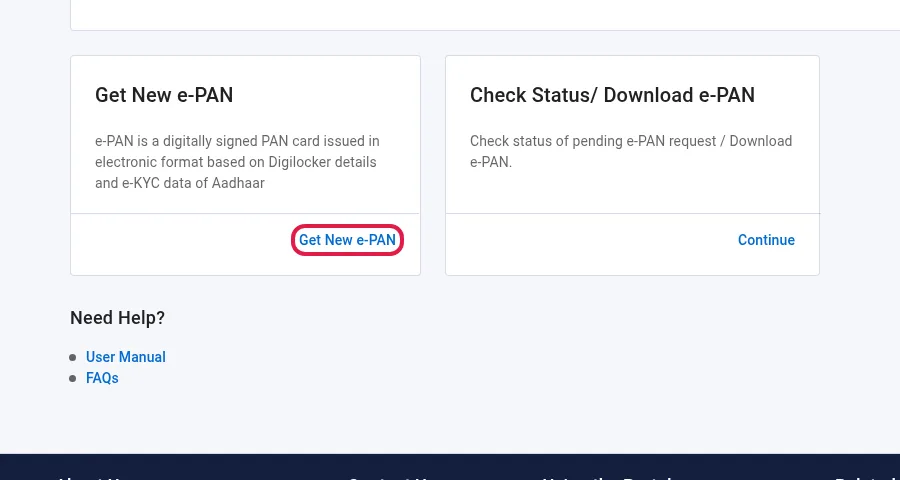
Screenshot of incometax.gov.in, 14 Oct 2026. The red outline is ours. -
Tick all four eligibility statements and the box that lets the portal use your DigiLocker and Aadhaar e-KYC data. Click Continue.
-
Read the disclaimer and click Continue. The portal takes you to DigiLocker.
-
In DigiLocker, type your Aadhaar number (or Virtual ID) and the captcha, and click Next.
-
Type the OTP sent to your Aadhaar-linked mobile and click Continue.
-
Type your 6-digit DigiLocker security PIN and click Continue. Forgot it? Use Forgot security PIN?
-
Choose the document to share as proof of your date of birth, and click Allow. (If you choose more than one, the first one in alphabetical order is used.)
-
Back on the e-Filing portal, type your Aadhaar number again and ask for an OTP.
-
Type the new OTP and click Continue. Each OTP works for 15 minutes, and you get 3 tries.
-
Type your father's name, tick I Accept that, click Submit, then Continue.
-
Adding your email is optional. Write down the Acknowledgement Number shown on the screen. You will also get an SMS.
Download your e-PAN
- Go to the same Instant E-PAN page and click Continue on Check Status/ Download e-PAN.
- Type your Aadhaar number and click Continue.
- Type the OTP and click Validate Aadhaar OTP and Continue.
- If your PAN has been allotted, click Download e-PAN (or View e-PAN).
After you get your PAN you can also register on the e-Filing portal (the page shows a Create e-Filing Account button), which you will need for tax returns.
Help
- e-Filing helpdesk: 1800 103 0025 or 1800 419 0025 (8 am to 8 pm, Monday to Friday).
- PAN queries (Protean, formerly NSDL): +91-20-27218080 (7 am to 11 pm, all days).
Good to know
- Use only the official incometax.gov.in portal. It is free there, so there is no need to pay an agent for this service.
- The Income Tax Department says its official emails never contain links. Treat any message with a "get PAN" link as a scam.